word打开报错the resource dll can not be loaded的处理方法
提问人:ylm发布时间:2026-01-05
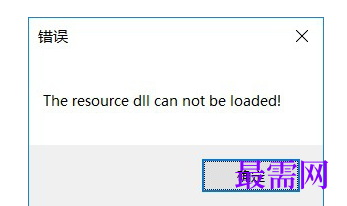
1、word软件突然打开就报错,“the resource dll can”贴述方法,首先打开加载项,路径为:文件-选项-加载项。

2、选中"Microsoft Word 原稿用纸アドイン",点击下方的“转到(G)”按钮,出现下图对话框。

3、取消勾选"Microsoft Word 原稿用纸アドイン",重新打开文件即可,报错''the resource dll can not be loaded''不再出现。
继续查找其他问题的答案?
相关视频回答
-
Word 2019如何转换为PowerPoint?(视频讲解)
2021-01-2511次播放
-
PowerPoint 2019如何为切换效果添加声音?(视频讲解)
2021-01-232次播放
-
PowerPoint 2019如何设置切换效果的属性?(视频讲解)
2021-01-232次播放
-
PowerPoint 2019如何为幻灯片添加切换效果?(视频讲解)
2021-01-230次播放
-
2021-01-199次播放
-
2021-01-194次播放
-
2021-01-192次播放
-
2021-01-192次播放
-
2021-01-1913次播放
-
2021-01-196次播放
 办公软件操作精英——周黎明
回复(0)

 湘公网安备:43011102000856号

点击加载更多评论>>