Office365文档如何在线翻译-Office365文档在线翻译
提问人:wx20251019143144发布时间:2026-04-28
近日有一些小伙伴咨询小编Office365文档如何在线翻译?下面就为大家带来了Office365文档如何在线翻译的攻略,有需要的小伙伴可以来了解了解哦。
1.单击审阅
在Office365文档编辑页面,勾选需要翻译的内容。
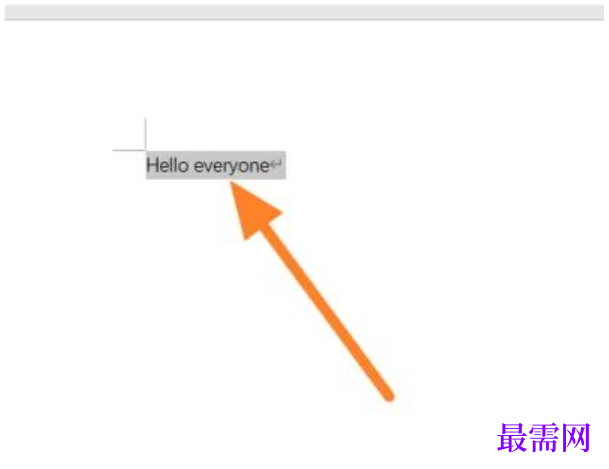
3.翻译内容
<p font-size:16px;text-align:justify;white-space:normal;background-color:#ffffff;"="" style="margin-top: 0px; margin-bottom: 0px; padding: 0px; border: 0px; font-variant-numeric: inherit; font-variant-east-asian: inherit; font-variant-alternates: inherit; font-variant-position: inherit; font-variant-emoji: inherit; font-stretch: inherit; font-size: 14px; line-height: 2; font-family: "Microsoft YaHei", "Hiragino Sans GB", Arial, sans-serif; font-optical-sizing: inherit; font-size-adjust: inherit; font-kerning: inherit; font-feature-settings: inherit; font-variation-settings: inherit; vertical-align: baseline; text-wrap-mode: wrap; background-color: rgb(255, 255, 255); color: rgb(51, 51, 51);">展开翻译后,选择翻译所选内容即可。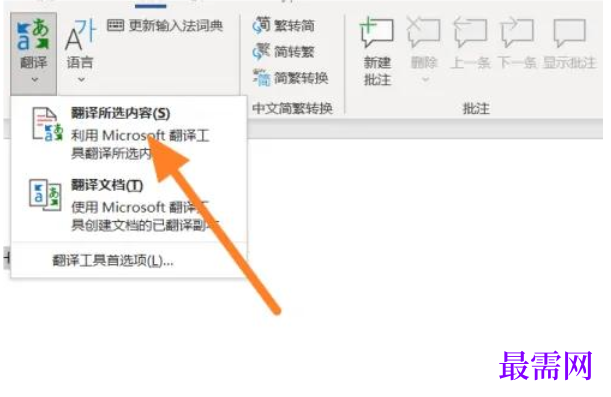
继续查找其他问题的答案?
相关视频回答
-
2021-02-2712次播放
-
2021-02-274次播放
-
2021-02-278次播放
-
2021-02-275次播放
-
2021-02-273次播放
-
2021-02-2712次播放
-
2021-02-279次播放
-
2021-02-27191次播放
-
2021-02-274次播放
-
2021-02-276次播放
 办公软件操作精英——周黎明
回复(0)

 湘公网安备:43011102000856号

点击加载更多评论>>